
Writing an apology email is more than just saying “sorry.” It’s about taking responsibility, rebuilding trust, and showing professionalism when something goes wrong. Whether you missed a deadline, sent the wrong file, or forgot an important attachment, the right apology email can turn a mistake into an opportunity to demonstrate reliability.
A well-written professional apology email reassures the recipient that you understand the impact of the mistake and are committed to fixing it. When done correctly, it restores confidence and strengthens your working relationship.
A sincere apology can repair relationships, reinforce your credibility, and improve how others perceive your communication skills. It’s one of the simplest yet most powerful forms of professional courtesy.
In this guide, you’ll learn how to write and format a professional apology email that sounds sincere, clear, and confident even in challenging situations.
Short Apology Email Example:
Subject: Apology for the Oversight
Hi [Name],
I apologize for the oversight in my previous message. I understand the inconvenience this may have caused. I’ve corrected the issue and ensured it won’t happen again.
Thank you for your understanding.
Best regards,
[Your Name]
Before we dive in, here are a few quick tips:
- Be clear and specific. A subject line like “Apology for the Delay in Your Delivery” works better than “Sorry.”
- Take responsibility quickly. Avoid excuses and show you understand the impact.
- Offer a fix. Let them know what you’ve done or will do to correct the issue.
- Close professionally. Thank them for their understanding and invite further communication if needed.
Now that you know why apology emails matter, let’s explore when to send one and how to make sure your apology email feels sincere and professional.
Key Takeaways for Apology Email
Purpose and Value Trust
When to Send Timing
Key Elements Structure
- Clear subject line
- Acknowledge the mistake
- Take responsibility and show empathy
- Offer a fix and next steps
- Close with a polite signature
Simple Three Step Format Easy
Tone and Empathy EQ
Avoid These Mistakes Save Time
Examples and Templates Ready Now
Follow Up Timing After Send
Helpful Tools Faster Work
Tip, press Open All to scan every point or Close All to keep the page tidy.
Why Apology Emails Matter in Professional Communication
Everyone makes mistakes, whether it’s a missed deadline, a wrong name in an email, or even forgetting to attach an important file. What separates a professional from the rest is how they respond when things go wrong. That’s where an apology email becomes essential.
In the workplace, good communication builds trust, and a thoughtful apology helps restore it when something goes off track. A quick, sincere message shows maturity, accountability, and respect for the other person’s time and feelings. It tells them, “I value our relationship, and I care enough to make it right.”
Apology emails also help prevent small issues from becoming bigger ones. A well-timed message can ease tension before frustration builds up and can often turn a negative situation into a positive one. In fact, people tend to remember how you handled the mistake more than the mistake itself.
Here’s why a well-written apology email matters:
- It shows professionalism. Taking ownership instead of avoiding blame reflects emotional intelligence and reliability.
- It repairs relationships. Clients, colleagues, or managers appreciate honesty and transparency.
- It protects your reputation. Addressing the issue early avoids misunderstandings or long-term mistrust.
- It improves team culture. Open communication creates a safer, more respectful environment at work.
The truth is, an apology doesn’t make you look weak; it makes you look confident enough to take responsibility. It’s one of the strongest habits you can build in professional communication.
Now that we’ve seen why apology emails matter, it’s time to understand their real purpose and when sending one is the right choice.
Understanding the Purpose of a Professional Apology Email
Before you start writing, it’s important to understand why and how to write an apology email the right way. The purpose isn’t just to admit fault; it’s to rebuild trust and show that you value the relationship enough to make things right.
A well-crafted apology email does three main things:
- Acknowledges the mistake clearly so the other person feels heard and respected.
- Shows genuine empathy for any inconvenience or frustration caused.
- Offers a practical solution or next step that restores confidence in your professionalism.
Studies from Berkeley’s Greater Good Science Center also emphasize that effective apologies include acknowledgment, remorse, and a commitment to change.
When written sincerely, an apology email does more than fix a momentary issue. It strengthens long-term relationships, whether that’s with a client, a boss, or a team member. People appreciate honesty, and they remember how you handled a situation far more than what caused it.
Let’s break this down further.
When Should You Send an Apology Email?
Not every mistake needs a long written apology. The key is knowing when an email is the best way to communicate, especially when offering quick and sincere apologies in email.
An apology email is the right choice when:
- You’ve made a minor mistake that doesn’t require a formal meeting (for example, sending the wrong document, missing a small deadline, or forgetting an attachment).
- You need to create a written record of your apology, especially when dealing with clients or partners.
- The issue can be resolved quickly through written communication without escalating it further.
However, sometimes a phone call or an in-person conversation works better.
Use this simple rule:
| Situation | Best Response | Why |
|---|---|---|
| Minor mistake (e.g., typo, small delay, missing file) | Apology email | Quick, professional, easy to track |
| Major issue (e.g., project failure, major misunderstanding) | Phone call or video chat | Tone and empathy come through better |
| Conflict involving multiple people | Team meeting or direct conversation | Avoids miscommunication |
| Legal or sensitive matter | Consult with HR or manager first | Prevents unnecessary liability |
A helpful way to decide is to ask yourself:
“Would I want this apology documented, or would it sound better in person?”
If it’s simple and you can fix it quickly, email works best. If emotions or major consequences are involved, choose a call or meeting instead.
The Psychology Behind a Sincere Apology
A genuine apology works because it restores a sense of fairness and respect. When someone feels that their experience or trust has been damaged, acknowledging it shows empathy. In psychology, this is called restoring relational balance.
People are more forgiving when they see three things in your message:
- Honesty: You admit the mistake directly.
- Empathy: You recognize how it affected them.
- Action: You explain what you’ll do to make it right.
According to research from Harvard Business Review, the most effective apologies focus on acknowledgment, empathy, and clear action.
The combination of these three signals tells the reader, “I understand, I care, and I’m fixing it.” That’s why the best apology emails feel simple, warm, and human, not robotic or overly formal.
Once you understand why an apology matters, the next step is learning what makes one effective. Here’s how to build an apology email that feels sincere and professional.
Key Elements of a Professional Apology Email
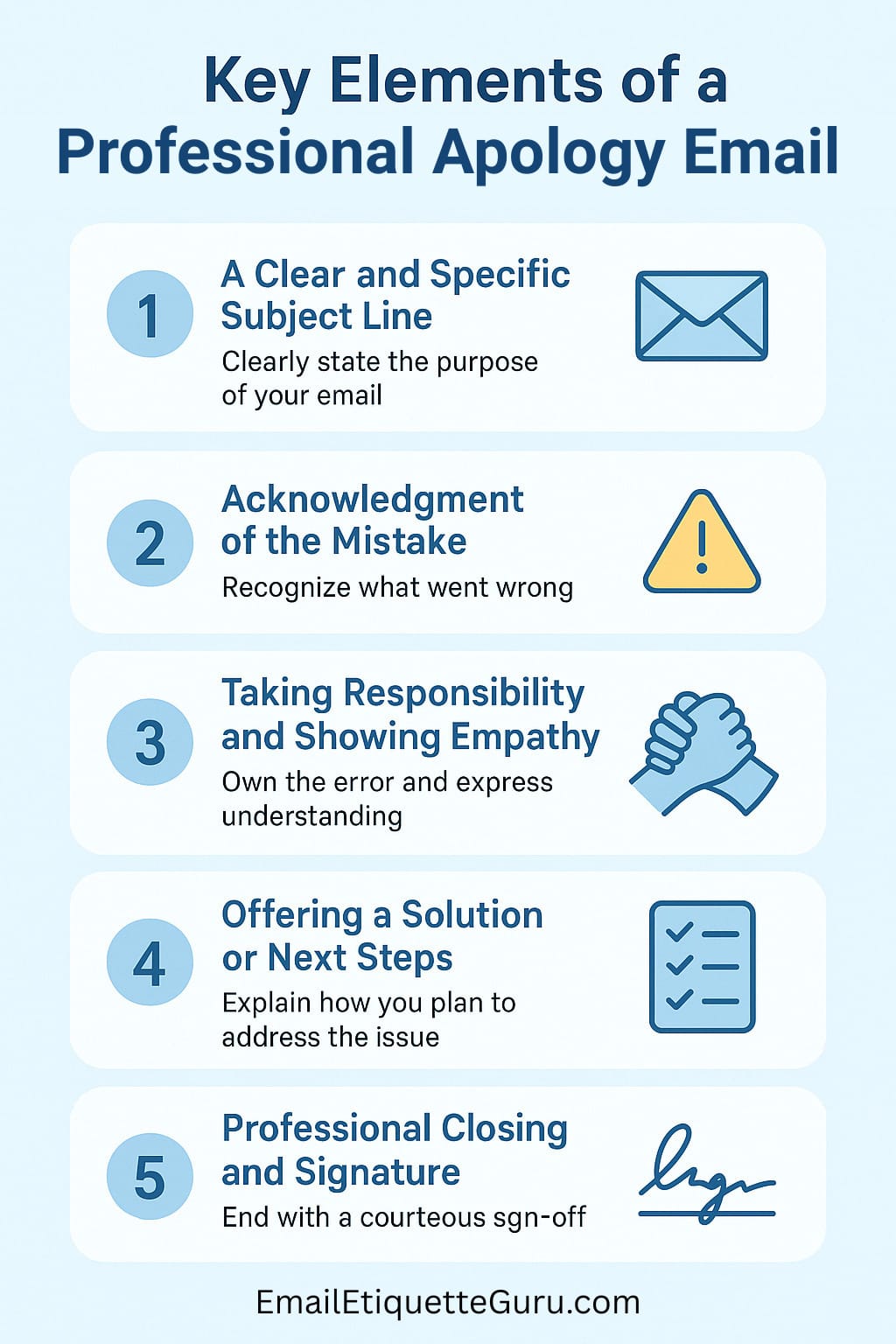
A great apology email feels sincere, respectful, and solution-focused. It’s not about writing a long explanation; it’s about being honest, direct, and reassuring. The structure of your message plays a big role in how it’s received.
These components are essential if you want to learn how to write an apology email professionally, one that shows empathy and restores credibility.
Here are the five key elements that make an apology email truly effective:
1. A Clear and Specific Subject Line
Your subject line is the first thing the recipient sees, so make it simple and to the point. Avoid vague words like “Sorry” or “My Apology” on their own. Instead, clearly state what your message is about.
Examples:
- Apology for the Delay in Sending Your Invoice
- Apology for the Incorrect Order Details
- Apology for the Confusion in Yesterday’s Meeting
- Apology for Missing Attachment (You can link to your dedicated guide here)
A clear subject line helps the recipient immediately understand your intention and ensures your email doesn’t get overlooked.
2. Acknowledgment of the Mistake
Start by acknowledging what went wrong. Be specific, but don’t overexplain. This shows the other person that you understand the situation and are not avoiding responsibility.
Example:
I realize I sent the wrong version of the proposal earlier today, which may have caused some confusion.
This simple acknowledgment immediately sets the right tone. It shows awareness and sincerity.
3. Taking Responsibility and Showing Empathy
The next step is to own up to your mistake and express empathy for any inconvenience caused. Avoid phrases that shift blame, such as “I’m sorry if you felt upset” or “There seems to have been a misunderstanding.” These sound defensive and weaken your apology.
Instead, use straightforward and empathetic language like:
I take full responsibility for the oversight and understand it may have caused frustration.
Empathy builds connection. It tells the recipient you see the situation from their perspective.
4. Offering a Solution or Next Steps
Apologies mean little without action. Let the recipient know what you’re doing to fix the mistake or prevent it from happening again. It can be as simple as sending the correct file, rescheduling a meeting, or offering compensation if appropriate.
Example:
I’ve attached the correct version of the report and double-checked all details to ensure accuracy this time.
This part transforms your apology from a mere acknowledgment into a resolution. It shows accountability and reliability.
5. Professional Closing and Signature in Your Apology Email
End your email on a positive and polite note. Thank the person for their understanding, and invite them to reach out if needed. If you’re wondering how to end an apology email, keep it short, sincere, and warm.
Example:
Thank you for your patience and understanding. Please let me know if there’s anything else I can do to make things right.
Best regards,
[Your Name]
A respectful closing reinforces your sincerity and helps end the message on a professional note.
For additional guidance on professional email tone and etiquette, you can refer to the Purdue Online Writing Lab (OWL).
When these five elements come together, your email feels balanced, honest but not dramatic, apologetic but still confident.
You’re showing that you care about fixing the problem while maintaining professionalism and respect.
You now know the key ingredients of a strong apology email. Let’s bring them together in a simple, practical framework you can follow every time.
Step-by-Step Guide: How to Write an Apology Email
Now that you know the key elements of an effective apology email, let’s put everything together. Writing an apology email becomes much easier when you follow a simple structure. Here’s a practical three-step guide you can apply to any situation, whether you’re writing to a client, a manager, or a colleague.
Follow this practical process to understand how to write an apology email that feels genuine and well-structured.
Step 1: Identify the Reason for Your Apologies in Email
Before you start typing, take a moment to understand exactly what went wrong and how it affected the other person. Be clear about the mistake and the impact it caused.
Ask yourself:
- What was my mistake or oversight?
- Who was affected and how?
- Can I fix it immediately, or will it take more time?
Knowing these answers helps you write a focused and genuine message.
Example:
I just realized that I missed including the latest attachment in my earlier email. I understand this may have delayed your review process.
Step 2: Choose the Right Tone and Language
Your apology email tone should match the situation and your relationship with the recipient. The goal is to sound sincere, not overly formal or too casual.
Here’s how to adjust your tone:
| Audience | Tone Example | Notes |
|---|---|---|
| Client or Customer | “I completely understand how this delay might have inconvenienced you. I’ve already corrected the issue and ensured it won’t happen again.” | Use polite and reassuring language. Keep it professional but warm. |
| Manager or Supervisor | “I take full responsibility for missing the deadline and understand its impact on our project timeline. I’ve already rescheduled the tasks to stay on track.” | Show accountability and proactive action. |
| Colleague or Team Member | “I’m really sorry for not updating you earlier. That must have caused some confusion in your part of the work.” | Keep it friendly and conversational while still respectful. |
The best tone feels natural and personal, as if you’re talking to the person directly. Avoid robotic or overly formal sentences like “I wish to express my sincerest apologies.” Instead, use plain, human language that feels genuine.
Step 3: Structure Your Email Properly
Here’s a simple apology email format you can follow for almost any apology email:
1. Subject Line: Clearly state the reason for the apology.
Apology for the Delay in Sending the Proposal
2. Opening Line: Acknowledge the mistake directly.
I realize I sent the wrong version earlier today.
3. Apology Statement: Take responsibility and express empathy.
I take full responsibility for the confusion this may have caused.
4. Solution: Explain what you’ve done or will do to fix it.
I’ve attached the correct file and double-checked all details.
5. Closing Line: End politely and professionally.
Thank you for your understanding. Please let me know if there’s anything else I can do to assist.
When you follow this structure, your message reads clearly and confidently. The recipient can immediately see that you understand the issue and are taking action to resolve it.
Pro Tip: Always proofread your apology email before sending. A spelling mistake or missing attachment (again!) can undermine your sincerity
Even with a solid structure, some apology emails still fall flat. Here are the most common mistakes to watch out for and how to avoid them.
Common Mistakes to Avoid When Writing a Professional Apology Email
Even with the best intentions, some apology emails can come across as insincere, defensive, or overly formal. The goal of an apology is to rebuild trust, not to make things more complicated or awkward.
Here are some of the most common mistakes people make when writing apology emails and how to avoid them.
1. Being Too Vague
Avoid generic lines like “I’m sorry for the inconvenience” without explaining what the inconvenience actually was. Vague apologies sound robotic and detached.
Instead, be specific about what happened and how it affected the other person.
“I’m sorry for sending the wrong file earlier today, which caused confusion during your review.”
This simple level of detail shows that you’re aware of your mistake and care enough to take responsibility.
2. Over-Explaining or Making Excuses
It’s natural to want to defend yourself or explain what went wrong, but too much explanation can sound like an excuse. Keep your email short and focused on the solution.
Avoid:
“I was extremely busy with another project, so I didn’t have enough time to check the file, and that’s why this happened.”
Better:
“I missed reviewing the file before sending it. I’ve corrected it and attached the right version now.”
Short, honest, and direct always wins.
3. Overusing “Sorry”
Repeating “sorry” too many times can make your email sound uncertain or exaggerated. You only need to apologize once; what matters most is the sincerity of that one line.
Avoid:
“I’m really sorry, truly sorry for this mistake. I feel so bad about it.”
Better:
“I apologize for the confusion earlier and appreciate your patience as I correct it.”
Keep it genuine, not dramatic.
4. Forgetting to Offer a Solution
Apologies without action feel incomplete. Always mention what you’ve done (or will do) to fix the issue. Even small follow-up steps make a big difference.
For example:
“I’ve reattached the correct file below and confirmed that all details are accurate this time.”
5. Using a Cold or Overly Formal Tone
Apology emails should feel personal, not robotic. Avoid stiff phrases like “I hereby extend my sincerest apologies for the inconvenience caused.”
Instead, use simple, conversational language:
“I realize this may have caused you some frustration, and I truly appreciate your understanding.”
Warmth and clarity always come across better than formality and jargon.
6. Not Following Up When Needed
Sometimes, an apology alone isn’t enough, especially if the issue required correction or approval. Always follow up if you promised a next step. This shows accountability and keeps communication open.
Example:
“Just checking in to confirm that you received the corrected file I sent yesterday. Please let me know if everything looks good on your end.”
Avoiding these mistakes keeps your apology professional, clear, and effective. It also makes you stand out as someone who values communication and accountability.
Theory is helpful, but real examples make things clearer. Let’s look at a few ready-to-use apology email templates for different situations.
Real-Life Examples of Apology Emails (Templates Included)
Once you know how to write an apology email, examples like these make it easier to adapt your tone and structure to any situation, whether you’re writing to a client, a colleague, or your boss.
Each of these templates is designed to sound professional, human, and sincere, not overly formal or robotic. You can easily modify the wording based on your role, relationship, and context.
Example 1: Formal Apology Email to a Client
Subject: Apology for the Delay in Sending Your Order Update
Email Example:
Dear [Client’s Name],
I hope you’re doing well. I want to sincerely apologize for the delay in sending your order update. I understand how important timely communication is and that this delay may have caused inconvenience.
The good news is that your order has now been processed, and I’ve included the updated tracking details below. I’ve also taken steps to make sure updates like this are sent promptly in the future.
Thank you for your patience and understanding. Please let me know if there’s anything else I can assist you with.
Best regards,
[Your Name]
This kind of formal apology email to a client works well because it’s clear, professional, and focused on action, not excuses.
Example 2: Apology Email to a Colleague or Team Member
Subject: Apology for Missing Yesterday’s Update
Email Example:
Hi [Name],
I just realized I didn’t share yesterday’s update on the marketing plan as planned. I understand this might have caused confusion when you were finalizing your part.
I’ve attached the document below and highlighted the latest points in yellow for quick review. I’ll make sure future updates are sent on time to avoid any delays.
Thanks for your patience and for keeping things moving.
Best,
[Your Name]
This version keeps the tone casual yet respectful, perfect for internal communication between colleagues.
Example 3: Professional Apology Email to a Manager
Subject: Apology for Missing the Project Deadline
Email Example:
Dear [Manager’s Name],
I want to apologize for missing the project deadline yesterday. I understand this delay affected the overall schedule and the team’s workflow.
I take full responsibility and have already adjusted my timeline to ensure all remaining tasks stay on track. I’ve also reviewed what caused the delay and have set up reminders to avoid this issue in the future.
Thank you for your understanding and support. I truly appreciate your guidance.
Best regards,
[Your Name]
This message shows ownership, reflection, and proactive behavior, all of which managers respect.
Example 4: Professional Apology Email for Forgetting an Attachment
Subject: Apology for the Missing Attachment in My Previous Email
Email Example:
Dear [Recipient’s Name],
I just noticed that I forgot to include the attachment in my previous email. I’m really sorry for the oversight and any inconvenience this caused.
I’ve now attached the correct file for your reference. Please let me know if everything looks good or if you need anything else from me.
Thank you for your understanding.
Best regards,
[Your Name]
If this happens to you often (don’t worry, it happens to everyone!), we’ve created a dedicated guide you’ll find helpful.
👉 Read: How to Write an Apology Email for Forgetting an Attachment
These examples cover most everyday scenarios in professional communication. The key takeaway is simple: Be specific, take responsibility, offer a solution, and close politely.
Writing a clear apology is one thing, but making it truly effective requires a few extra touches. Here are some tips to make your message feel genuine and impactful.
Tips for Making Your Apology Email More Effective
Not all apologies have the same impact. Sometimes, even a well-worded email can fall flat if it’s sent too late, sounds mechanical, or lacks warmth. The effectiveness of your apology depends on when, how, and what you say.
Here are a few powerful tips to help you learn how to write an apology email that feels authentic and memorable.
1. Timing Is Everything
The sooner you send your apology email, the better. A quick, sincere message shows that you take responsibility seriously. Waiting too long can make the other person feel ignored or undervalued.
Send your apology as soon as you realize the mistake, even if you’re still working on fixing it. A short acknowledgment first, followed by an update later, is often the best approach.
Example:
Hi [Name],
I just noticed that I sent the wrong version of the report earlier today. I’m correcting it now and will send the accurate file within the next hour. I’m really sorry for the mix-up and appreciate your patience.
Quick action shows awareness and professionalism.
2. Match the Delivery to the Situation
Email is ideal for minor issues, but if the mistake is more serious or emotionally charged, a personal approach works better. A short phone call or in-person chat can communicate empathy far more effectively than text.
Use this quick guide:
- Minor mistake: Email (e.g., missed attachment, small delay)
- Moderate mistake: Email + quick follow-up message or call
- Serious mistake: Direct phone call or meeting before sending a written recap
Choosing the right medium shows that you care about the relationship, not just the formal process.
3. Keep the Focus on the Recipient
An effective apology centers on the other person’s experience, not your own guilt or frustration. Avoid making it about how bad you feel; instead, focus on acknowledging their inconvenience and showing empathy.
Bad example:
I feel terrible for messing this up. I’ve been really stressed lately, and it just slipped my mind.
Better example:
I understand this caused you some inconvenience, and I truly appreciate your patience as I work to make it right.
Focusing on the recipient keeps your apology professional and balanced.
4. Use Emotional Intelligence in Your Email Writing
Words carry emotion, even in email. The best apology messages strike the right balance between empathy and professionalism.
Developing emotional intelligence in the workplace is one of the best ways to improve written communication. The Harvard Business School Online explains that emotionally aware employees are better at building trust and resolving conflict.
Here are a few emotional-intelligence tips to apply:
- Avoid blame. Never use “if” or “but” after “sorry.”
- Mirror the other person’s communication tone — if they’re formal, stay formal; if they’re friendly, match that warmth.
- Keep your sentences short and clear to sound natural and genuine.
- End on a hopeful note that invites continued collaboration.
Example:
Thank you for your understanding. I appreciate your patience, and I’m looking forward to continuing our work together.
This kind of language feels thoughtful and relationship-focused, not just transactional.
5. Reinforce With Action
An apology means more when backed by visible steps. After apologizing, take real action, whether it’s updating a process, setting reminders, or communicating better next time.
You can even mention this briefly in your message:
I’ve set up an internal reminder system so I can double-check all outgoing reports from now on.
This shows you’re not only sorry but also committed to preventing the same mistake in the future.
When you combine empathy, timing, and follow-through, your apology becomes far more meaningful. It shows maturity, respect, and strong professional values, the kind of communication people remember.
Sometimes, the best move is to pause before writing. Here’s how to recognize situations where an email apology might not be the right choice.
When Not to Send an Apology Email
While learning how to write an apology email is essential for most professional situations, there are times when sending one isn’t the right move. In some cases, an email might make the situation worse, come across as impersonal, or even create a written record that could work against you later.
Knowing when not to send an apology email is just as important as knowing how to write one.
Here are the key situations where you should pause before hitting “Send.”
1. When the Issue Is Emotionally Sensitive or Personal
If someone is upset, disappointed, or emotionally affected by your mistake, a written apology might feel distant. It’s better to reach out in person or by phone, where tone and empathy come through naturally.
Example:
Instead of writing: “I’m sorry if you were offended by what I said in the meeting,” Say it in person or on a call: “I realize what I said came across the wrong way, and I truly regret it.”
A real conversation helps repair emotional trust faster than written words ever could.
2. When the Situation Is Legally or Professionally Sensitive
Avoid sending an apology email if your mistake involves legal, contractual, or HR-related matters, such as employee disputes, client contract breaches, or confidential errors. Written apologies can sometimes be misinterpreted as formal admissions of liability.
In these cases, it’s better to:
- Speak with your manager or HR department first.
- Ask whether written communication is appropriate.
- If necessary, let your company handle the message officially.
Example:
“Before sending any message to the client, I wanted to confirm how we should address this issue internally.”
When in doubt, always check before putting anything in writing.
3. When the Relationship Requires a Personal Touch
Sometimes, an email feels too transactional for the nature of the relationship. For example, if you have a close working relationship with someone, or if the mistake affected them directly, a quick call or face-to-face chat can be more impactful.
People can hear sincerity in your voice, something a written message can’t always express.
4. When You’ve Already Apologized in Person
Once you’ve given a heartfelt apology in person, sending another email right after can seem repetitive or forced. Instead, wait a day or two and follow up only if there’s a next step to share (like a correction, document, or confirmation).
A better approach is to write a short recap email later to confirm your action, not to re-apologize.
Example:
“As discussed, I’ve updated the file and sent it to the client. Thank you again for understanding.”
This shows accountability without over-apologizing.
5. When the Situation Is Still Unclear
If you’re not yet sure what went wrong or who’s responsible, avoid sending an apology too soon. A premature apology can confuse the situation or make you appear careless.
Instead, gather the facts first, then send a clear and confident apology once you understand what happened.
Example:
“I’m still reviewing what caused this issue, and I’ll send an update once I have the full details.”
It’s better to pause and send a thoughtful message later than to rush one and risk misunderstanding.
The rule is simple: email is great for clarity and record-keeping, but not for emotion-heavy or sensitive issues.
Once your apology has been sent, you may wonder what happens next. Here’s how to follow up gracefully and maintain professionalism.
How to Follow Up After Sending an Apology Email
Sometimes, even after sending a sincere email apology, you may not get a response right away. That doesn’t necessarily mean the person is upset, they might just be busy, processing your message, or waiting for the situation to resolve itself.
Still, when you know how to write an apology email, a polite follow-up helps show accountability and ensures your message was received and understood. The key is to sound thoughtful, not pushy.
1. Give It a Bit of Time
Before following up, wait a reasonable amount of time — usually 24 to 48 hours for smaller issues, or a few days for more complex ones. Rushing to check in too soon can make it seem like you’re seeking forgiveness instead of giving the person space to respond.
Use your judgment based on the context. If the matter was urgent (like a client deadline), it’s fine to follow up sooner. If it was personal or emotional, give them more breathing room.
2. Keep the Follow-Up Short and Professional
Your follow-up doesn’t need to repeat the apology. Instead, focus on confirming the action you took and checking whether everything is resolved.
Here’s a good structure:
- A brief greeting
- A polite reference to your earlier email
- Confirmation of the correction or action you took
- A simple question or closing line
Example:
Hi [Name],
I just wanted to follow up on the email I sent earlier this week regarding the delayed report. I’ve corrected the issue and reattached the final version below.
Please let me know if everything looks good or if there’s anything else you’d like me to adjust.
Thanks again for your understanding.
Best regards,
[Your Name]
This message shows that you’ve taken responsibility and completed the fix, without repeating the apology or sounding defensive.
3. Be Genuine, Not Defensive
If the recipient responds with feedback or criticism, avoid explaining too much or trying to justify your actions. Instead, thank them for their input and show you’re learning from it.
Example:
Thank you for pointing that out. I really appreciate your feedback, and I’ll make sure to double-check similar details in the future.
A short, gracious response is enough. You don’t need to apologize again unless something new comes up.
4. End on a Positive, Forward-Focused Note
Once you’ve followed up and confirmed the issue is resolved, close the loop with appreciation and optimism. This leaves the interaction on a good note and reinforces professionalism.
Example:
I’m glad we were able to sort that out. Thanks again for your patience and support; I really value working with you.
This kind of tone helps rebuild warmth and trust after a mistake.
5. Know When to Stop Following Up
If you’ve sent your apology and one polite follow-up without a response, don’t keep emailing. Too many reminders can come across as needy or insincere.
Trust that your message was received, and focus on maintaining professionalism moving forward. Often, silence simply means the issue has been resolved.
A thoughtful follow-up shows maturity, awareness, and reliability, qualities that leave a lasting impression long after the mistake is forgotten.
If you want to make the process faster and easier, there are great tools and templates that can help you write thoughtful apology emails with confidence.
Tools and Templates to Simplify Apology Email Writing
Writing an apology email doesn’t have to feel stressful or time-consuming. Once you understand the structure and tone, you can use templates and writing tools to save time while still sounding sincere.
Here are some practical resources and techniques that can help you write better apology emails faster, whether you’re responding to a client, coworker, or manager.
1. Use Pre-Written Apology Email Templates for Common Scenarios
Having a few ready-made templates can help you respond quickly and professionally when mistakes happen.
Keep short drafts for common cases like:
- Forgetting to attach a file
- Sending the wrong information or link
- Missing a deadline or meeting
- Miscommunication with a client or colleague
Example mini-template:
Subject: Apology for the Confusion in My Earlier Email
Hi [Name],
I realized that the link I shared earlier was incorrect. I’m sorry for the confusion this may have caused. Here’s the correct link below:
[Insert correct link]
I’ve double-checked to make sure all other details are accurate. Thanks for your understanding!
Best,
[Your Name]
Templates like this make your writing process faster while keeping your tone consistent and polished.
2. Try AI-Powered Writing Assistants When Writing a Professional Apology Email
AI tools can help you polish your apology email, fix tone issues, and make sure your message sounds natural and professional.
Here are a few examples you can use:
- Grammarly: Helps you check tone, clarity, and grammar so your apology sounds warm and professional, not stiff or defensive.
- ChatGPT (or GPT-based tools): Great for drafting and rewriting your apology emails in different tones — such as polite, formal, or friendly.
- Hemingway Editor: Makes your writing clear and concise by highlighting complex or overused phrases.
💡 Tip: Always personalize AI-generated text. Add your name, specific details, and a genuine sentence or two so it feels authentic.
3. Save Personalized Snippets in Your Email Platform
If you use Gmail or Outlook, create saved templates or canned responses for different apology scenarios. That way, you can quickly select one, adjust a few details, and send it right away without rewriting from scratch.
For example:
- Template 1: Missed meeting
- Template 2: Late delivery
- Template 3: Sent wrong file
This system keeps you ready to respond fast and ensures every apology email meets the same professional standard.
4. Use Tone-Checking Extensions
Sometimes, your message might sound harsher or colder than intended. Tone-checking tools can help you identify how your email “feels” before you send it.
Tools like Linguix, Grammarly Tone Detector, or Outwrite highlight whether your email comes across as friendly, confident, or apologetic.
They’re especially useful when you want to sound empathetic without overdoing it.
5. Build an “Apology Email Folder”
It might sound funny, but keeping an “Apology Email” folder can be a lifesaver.
Save a few well-written examples that worked for you in the past. Over time, this becomes your personal reference library.
When a new situation comes up, you’ll have a quick head start instead of starting from scratch each time.
Using these tools and templates makes apology writing simpler, faster, and more confident. The more you practice, the more natural it becomes, and soon you’ll be able to craft thoughtful, clear apology emails in minutes.
Many professionals still have questions about apology emails — when to send them, what to say, or how formal they should be. Let’s clear up some of the most common doubts.
FAQs About How to Write an Apology Email
Even after learning the right structure and tone, many professionals still have small doubts about apology emails, how formal they should be, when to send them, and what to avoid saying.
Here are some of the most frequently asked questions to help you feel confident every time you hit “Send.”
1. How soon should I send an apology email after realizing my mistake?
As soon as possible.
The faster you send your apology, the more genuine it feels. Ideally, within a few hours or the same business day. If it’s a larger issue that needs clarification, send a short acknowledgment first, and follow up once you have the full details.
2. How long should an apology email be?
Keep it short — ideally 100 to 150 words.
Long messages often feel defensive or repetitive. Focus on four things: what went wrong, that you’re sorry, what you’ve done to fix it, and a polite close.
3. Should I use the word “sorry” or “apologize”?
Both are fine — it depends on your tone and the level of formality.
Use “sorry” when writing to colleagues or for small mistakes.
Use “apologize” for formal messages to clients, managers, or external partners.
Example:
– Friendly: “I’m really sorry for the mix-up earlier.”
– Formal: “I sincerely apologize for the confusion caused.”
4. What if the other person doesn’t reply to my apology email?
That’s perfectly normal.
Many people simply accept your apology and move on without replying. If it’s important to confirm that everything’s okay, send a short follow-up after 1–2 days (like the ones we discussed earlier). If there’s still no response, move forward professionally.
5. Can I apologize too much?
Yes.
Over-apologizing can make you seem unsure or overly self-critical. Say sorry once, then shift the focus to the solution and next steps. That’s what truly matters.
Example:
Instead of writing: “I’m so sorry again, I really feel terrible.”
Try: “I appreciate your patience, and I’ve already taken steps to prevent this from happening again.”
6. Is it okay to send an apology email for a very small mistake?
Yes, if it affected someone else’s work or caused confusion.
Even small errors — like forgetting to CC someone or sending an outdated link — deserve acknowledgment.
A short, polite message shows you care about accuracy and respect others’ time.
7. How can I make sure my sincere email apology sounds genuine, not copy-pasted?
Always personalize your email.
Mention what specifically went wrong, use the recipient’s name, and add a short line that reflects your relationship. Templates are helpful, but small personal touches make your message feel sincere.
Example:
“I really appreciate how understanding you were about this.”
That one line can make a big difference in how your apology feels.
By keeping your messages short, specific, and personal, you’ll never go wrong. The more authentic you sound, the faster people move on from the mistake, often with even more respect for your honesty.
As we come to the end of this guide, let’s reflect on why a sincere apology can be one of the strongest tools for professional growth and trust.
Conclusion: The Power of a Thoughtful Professional Apology Email
Mistakes happen to everyone, it’s part of being human. What truly matters is how you handle them. A thoughtful apology email shows emotional intelligence, respect, and professionalism. It turns a moment of discomfort into an opportunity to strengthen trust.
A well-written apology doesn’t just fix a problem; it leaves a lasting impression of accountability and sincerity. When people see that you care enough to own your mistakes and make things right, they’re far more likely to respect and trust you in the long run.
Whether you’re writing to a client, a colleague, or your manager, remember the key ingredients:
- Be clear and specific about the mistake.
- Take full responsibility without over-explaining.
- Offer a solution or next step.
- Close with warmth and gratitude.
Over time, this approach builds your reputation as someone who communicates with honesty and integrity, the kind of professional others actually enjoy working with.
Now that you know how to write an apology email from start to finish, remember that sincerity always wins. A thoughtful apology not only repairs mistakes but also strengthens relationships in the long run.
A sincere apology is not just about saying sorry; it’s about showing you care, taking responsibility, and moving forward with confidence. That’s the mark of true professionalism.
